


Key takeaways
– To manage eBay and Amazon orders well, sort your queue by deadline, not by arrival: late orders first, then everything due today.
– Amazon counts an order as late when the shipping confirmation comes after the expected ship date. Buying a label is not enough; you have to confirm dispatch.
– Amazon expects a Late Shipment Rate under 4%. eBay recommends a dispatch time of no more than 1 working day.
– Most late orders are not slow packing. They are small blockers – a missing weight, no shipping service, a bad address, no stock – found too late.
– One screen that shows every channel’s deadlines and blockers stops orders slipping between tabs.
Managing eBay and Amazon orders means getting every order confirmed as dispatched before its marketplace ship-by date, while catching the problems that stop a label being bought. The fastest way is one queue for both channels, sorted by deadline, with blockers flagged before you start printing.
If you sell motorcycle gear on eBay and Amazon, you know the morning. Thirty new orders, a helmet that’s out of stock, a pair of gloves with no weight on file, and an Amazon order that had to go yesterday. This guide gives you a routine that works whatever software you use, then shows how Stock Konnect puts it on one screen.
Why do eBay and Amazon orders go late?
Orders usually go late because of small blockers found too late, not slow packing. A missing weight stops the label, a vague address stops the courier, and an empty shelf stops the whole order. Checking each marketplace separately also hides deadlines, so an urgent Amazon order can sit behind a dozen eBay orders.
Three things make a mixed eBay and Amazon queue hard to run:
- Different deadlines in different places. Amazon shows an expected ship date on each order. eBay works from the dispatch time you set on the listing. Neither shows you the other.
- Order date is the wrong sort order. An order that came in at 9am today with a one-day dispatch time is less urgent than one from yesterday afternoon with a same-day promise. Sorting by “newest” hides that.
- “Label printed” feels like “done”. It isn’t. Until the shipment is confirmed with the marketplace, the buyer still sees “not dispatched” – and Amazon still counts the clock.
The fix is to turn the queue around: deadline first, blockers second, packing third.
What is a ship-by date on Amazon and eBay?
A ship-by date is the latest time an order can be confirmed as dispatched without counting as late. Amazon calls it the expected ship date and measures your Late Shipment Rate against it. On eBay it comes from your dispatch time, and the carrier should scan the parcel within that time.
On Amazon, the Late Shipment Rate counts orders whose shipping confirmation is completed after the expected ship date, as a percentage of orders over 10 and 30 days. Amazon’s policy is that sellers keep it under 4%; above that, selling privileges can be restricted. It only applies to orders you fulfil yourself, not FBA (Amazon Order Performance policy).
On eBay, the dispatch time is the time you take to hand the item to the delivery service after the buyer pays. eBay recommends no more than 1 working day, and gives the example that with a 1-day dispatch time an item paid on Monday must be dispatched and scanned by the carrier by Tuesday 11:59pm (eBay: estimated delivery dates for sellers). Late deliveries then count towards eBay’s seller standards, which you can read about in our guide to the Amazon late shipment rate and eBay’s limits.
| Amazon | eBay | |
|---|---|---|
| Deadline you see | Expected ship date on each order | Dispatch time you set on the listing |
| What counts as on time | Shipping confirmed by the expected ship date | Dispatched and scanned by the carrier within dispatch time |
| Main metric | Late Shipment Rate (under 4%) | Late delivery rate (Top Rated: no more than 3%) |
| What you must do | Confirm shipment with tracking | Dispatch on time and upload tracking |
The practical rule for both: the deadline belongs to the confirmation, not the label.
A daily routine for eBay and Amazon orders
A good daily routine works the queue by deadline: late orders first, then orders due today, then blockers, then labels in batches, then dispatch confirmation. Finish by checking labels bought earlier that were never marked dispatched. The whole routine fits on one screen when both channels share one queue.

- Start with late orders. Anything past its ship-by date goes first. Every hour adds to your late rate and to the chance of a “where is my order?” message.
- Then everything due today. Orders whose ship-by date is today, in time order. A helmet due by 2pm beats a pair of gloves due by midnight.
- Fix blockers before you print. Go through orders with no weight, no shipping service, an address problem or not enough stock. Fixing them now is quicker than finding them when a label fails.
- Buy labels in batches. Group by courier and service, print the labels and the pick list and packing slips together, then pick and pack.
- Confirm dispatch the same day. Mark orders as dispatched and send the tracking number back to the marketplace before the cut-off. On Amazon this is the moment the clock stops.
- Close the day with “labelled, not sent”. Look for labels bought yesterday or earlier that were never confirmed. These are the silent late orders: the parcel may have left, but the buyer still sees “not dispatched”.
If you also sell on Shopify, the same routine applies; Shopify orders just don’t come with a marketplace ship-by date, so use your own promise.
Which order problems should you fix before printing labels?
Fix the five problems that stop a label or a delivery: no weight, no shipping service, a bad address, not enough stock and a cancelled order. Each one is cheaper to fix before the label is bought than after – a wrong label costs money, and a cancelled order shipped is stock you won’t get back easily.
| Problem | Why it matters | Quick fix |
|---|---|---|
| No weight | The courier can’t price or create the label | Add the weight to the product once, so every future order has it |
| No shipping service | No rule matched the order’s weight, size or destination | Widen or add a shipping rule |
| Address problem | A bad postcode, no house number or a PO Box your courier can’t reach | Message the buyer before buying the label |
| Not enough stock | You can’t ship what you haven’t got | Check stock and your supplier, or contact the buyer early |
| Cancelled or refunded | The buyer cancelled after the order came in | Don’t ship it – check the order’s status first |
Address problems and stock problems are covered in more depth in our guide to reducing failed deliveries.
How do you find an order fast when you don’t know the tab?
Search by something the buyer or courier gives you – the order number, the buyer’s name, the postcode, the tracking number or the item title – across every order list at once. Searching one tab at a time is where minutes go when a buyer rings asking where their order is.
Buyers rarely quote your internal reference. They give you a name, a postcode or the tracking number from their email. A courier asking about a parcel gives you a tracking number only. Make sure your order tool can search all of these, across new, in-progress and shipped orders, and tells you where the order is.
Two habits save time on top of search:
- Saved views. If you check the same filters every morning – “eBay Germany, unshipped” or “Amazon, Royal Mail” – save them once and open them with one click.
- Order history. When a buyer asks what happened, you want one place that shows when the order arrived, when the label was bought, when tracking was sent and the latest courier scan.
See your eBay and Amazon deadlines on one screen. Stock Konnect puts late, due-today and blocked orders at the top of one orders page. Start your free 30-day trial.
Managing eBay and Amazon orders in Stock Konnect
Stock Konnect shows eBay and Amazon orders on one orders page with a summary of today’s work, a needs-attention bar that lists what blocks each order, a ship-by countdown on every Amazon and eBay order, and one search across every tab. The next step for every order is one click.
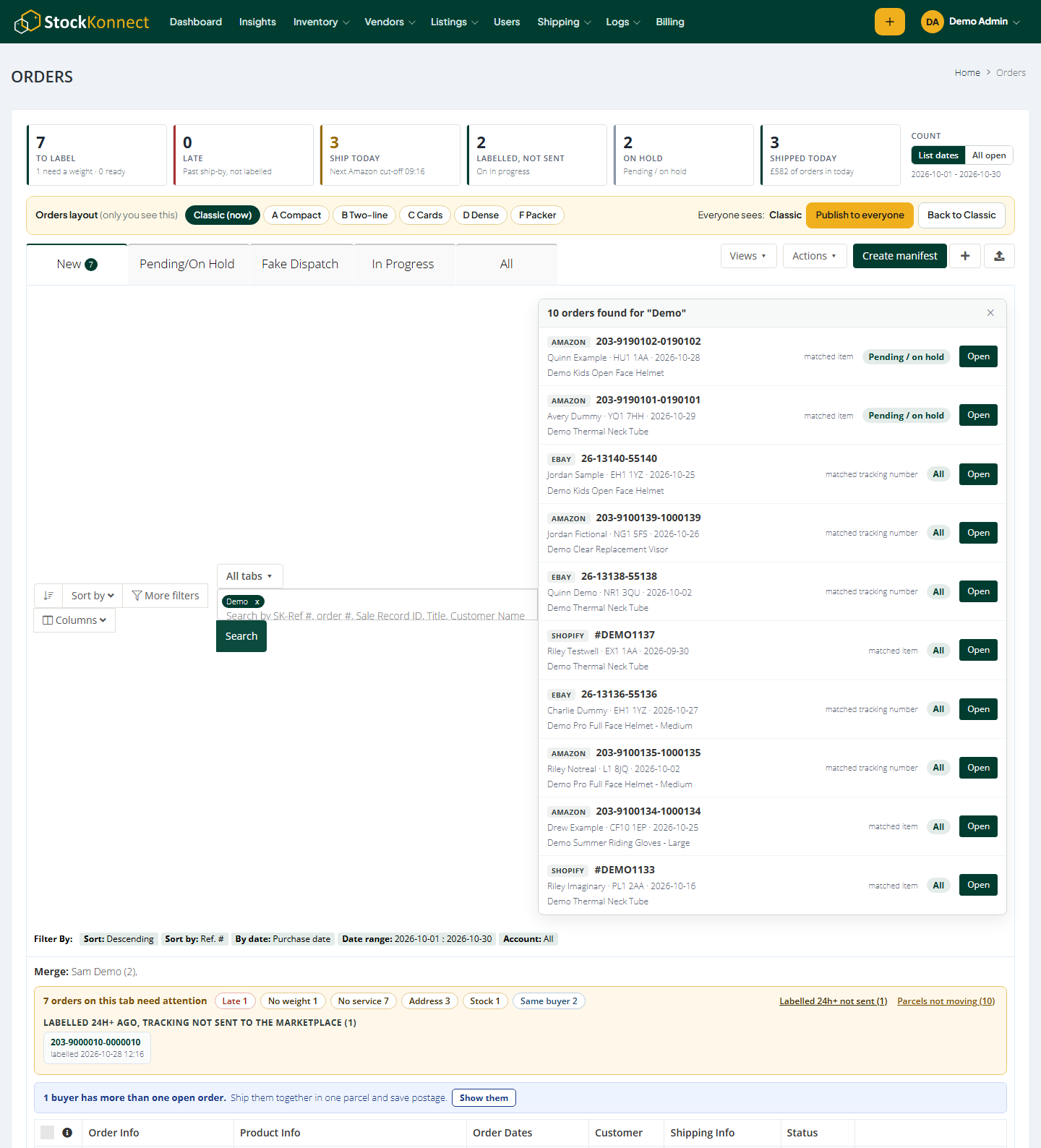
Here’s how the routine above maps onto the Stock Konnect order management screen:
- Today’s work at a glance. One strip at the top counts what’s to label, late, due today, labelled but not sent, on hold and shipped today. Click a number and the list shows only those orders – so step 1 and step 2 of the routine are one click each. Switch the count between the dates in your list and every open order.
- Needs attention. An amber bar above the list says how many orders on the tab need attention, with chips for Late, No weight, No service, Address, Stock and Same buyer. Click a chip to see only those orders. It also lists labels bought more than a day ago that were never marked dispatched, so you can spot them before the marketplace does.
- Ship-by countdown. Every Amazon and eBay order shows how long you have left – red “Late”, amber “Ship in 2h” or “Ship today”, grey “Tomorrow” – taken from the ship-by date the marketplace sends. You see at a glance which orders must go first.
- One button for the next step. Each order has one green button: Create shipment for a new order, Mark as dispatched once it has a label, View shipments once shipped. Notes, void and history sit in its menu. A cancelled or refunded order gets a red badge under its number, such as “Cancelled on eBay – don’t ship”, so you notice before you pack it.
- Search every tab at once. Search by order number, buyer, postcode, tracking number or item title, on this tab or all tabs, and open the order straight from the results.
- Saved views and shortcuts. Save your filters as your own views and share them with the team. Press ? on the orders page to see the keyboard shortcuts – for people who process orders all day.
- Order history in one click. See when the order arrived, who bought the label, when tracking was sent, your notes and the latest courier scan, in one panel.
- More orders on one screen. Each item’s size and label title fold into two small buttons. Items with no weight open their size boxes for you, so the orders that can’t get a label yet stand out.
Stock Konnect also brings your Shopify orders into the same list. Shopify doesn’t send a ship-by date, so those orders show no countdown, but they still appear in today’s work and the needs-attention bar. If you’re new to selling on both marketplaces, read how to sell on Amazon and eBay at the same time first.
Frequently asked questions
How do I manage eBay and Amazon orders in one place?
Use multichannel order management software that imports orders from both marketplaces into one list, with each order’s ship-by date. Work the list by deadline: late first, then due today. Confirm dispatch and upload tracking from the same screen so each marketplace is updated.
Does printing a shipping label count as dispatch on Amazon?
No. Amazon’s Late Shipment Rate is based on the shipping confirmation, which must be completed by the expected ship date. Buying a label doesn’t confirm the shipment. Mark the order as shipped with its tracking number before the deadline.
What dispatch time should I set on eBay?
eBay recommends a dispatch time of no more than 1 working day, as long as you can meet it reliably. With a 1-day dispatch time, an item paid for on Monday must be dispatched and scanned by the carrier by Tuesday 11:59pm.
What is a good Late Shipment Rate on Amazon?
Amazon’s policy is that sellers keep their Late Shipment Rate under 4%, measured over 10 and 30 days on orders they fulfil themselves. Above 4%, Amazon can restrict selling privileges. Aim far lower so a busy week doesn’t push you over.
Why do I have orders with a label but not dispatched?
A label was bought but the order was never marked as dispatched, so the marketplace was never told. The parcel may already be with the courier while the buyer still sees “not dispatched”. Check these at the end of every day and confirm them.
Does Stock Konnect show a ship-by countdown for Shopify orders?
No. The countdown uses the ship-by date Amazon and eBay send with each order, and Shopify doesn’t send one. Shopify orders still appear in Stock Konnect’s today’s work strip and needs-attention bar.
Sources
- Amazon Seller Central UK: Order Performance program policy (Late Shipment Rate under 4%; Valid Tracking Rate above 95%)
- eBay UK: Estimated delivery dates for sellers (dispatch time of no more than 1 working day)
- eBay UK: Seller performance standards (Top Rated late delivery rate)
- Stock Konnect: changelog (orders page updates, October and November 2026)