



Key takeaways
– The Amazon Late Shipment Rate (LSR) is the share of your seller-fulfilled orders whose shipping confirmation came after the expected ship date, over 10 and 30 days.
– Amazon’s policy is to keep it under 4%. Above that, Amazon can restrict or remove your selling privileges.
– It’s about the confirmation, not the parcel. An order packed on time but confirmed late still counts as late.
– eBay measures something different: late delivery. Top Rated sellers need no more than 5 late deliveries or 3% of transactions.
– Measure your own late dispatch every week, by channel, weekday and courier, so you see a problem before Amazon’s dashboard does.
The Amazon Late Shipment Rate is the percentage of your seller-fulfilled orders confirmed as shipped after their expected ship date, measured over 10 and 30 days. Amazon requires it to stay under 4%. You lower it by confirming shipment before the deadline, fixing order blockers early and watching your own dispatch figures weekly.
If you’ve had an account health warning, the number can feel like a black box. It isn’t. It’s one simple count, and once you know what moves it you can keep it close to zero – even in the November rush, when a rider orders a helmet, gloves and a heated base layer the week before a cold snap.
What is the Amazon Late Shipment Rate?
The Amazon Late Shipment Rate, also called the late dispatch rate, counts orders whose shipping confirmation was completed after the expected ship date, as a percentage of all your orders over a 10-day and a 30-day period. It applies only to orders you fulfil yourself, not to FBA orders.
Amazon explains why it matters: customers check the status of their order online, and a late confirmation leads to more A-to-z Guarantee claims, negative feedback and customer contacts (Amazon Order Performance policy).
The Late Shipment Rate is one of several order performance metrics in Account Health. Here’s how they sit together for Amazon.co.uk seller-fulfilled orders, all from the same Amazon policy:
| Metric | What it measures | Amazon’s target |
|---|---|---|
| Late Shipment Rate | Shipping confirmed after the expected ship date (10 and 30 days) | Under 4% |
| Cancellation Rate | Orders cancelled by you before shipping (7 days) | Under 2.5% |
| Valid Tracking Rate | Shipments with a valid tracking number (30 days) | Above 95% |
| On-Time Delivery Rate | Tracked units delivered by the “Deliver by” date | At least 90% |
| Order Defect Rate | Negative feedback, A-to-z claims and chargebacks (60 days) | Under 1% |
How is the Late Shipment Rate calculated?
Divide the number of orders confirmed as shipped after their expected ship date by your total seller-fulfilled orders in the period, then multiply by 100. Amazon shows it for 10 days and 30 days, so one bad week can show up quickly in the 10-day figure.
A worked example: in the last 30 days you shipped 250 orders yourself. Six were confirmed after their expected ship date.
6 ÷ 250 × 100 = 2.4%
That’s under 4%, but look at the 10-day window too. If four of those six late orders fell in the last 10 days, and you shipped 80 orders in that time, your 10-day rate is 4 ÷ 80 × 100 = 5% – over the limit, even though your month looks fine.
Two things follow from the definition:
- The confirmation is what counts. If you pack on time but confirm the next morning, the order is late.
- Small sellers swing faster. With fewer orders, every late one moves the percentage more. A seller with 40 orders in 10 days goes over 4% with just two late confirmations.
What happens if your Late Shipment Rate goes over 4%?
Above 4%, Amazon’s policy says it can restrict or remove your selling privileges. In practice you’ll first see the metric turn red in Account Health. A high rate also brings more A-to-z claims and negative feedback, which push up your Order Defect Rate – a second metric at risk.
Don’t wait for the warning. If your 10-day rate is climbing, look at which orders were late and why: a weekday you’re short-staffed, a product without a weight, a courier collection that comes after your cut-off, or orders that were labelled but never confirmed.
How is eBay’s late delivery rate different?
eBay doesn’t measure late shipment. It measures late delivery: a tracked item counts as late when the delivery scan is after the latest estimated delivery date and there was no carrier scan within your dispatch time. To be Top Rated, you need no more than 5 late deliveries or 3% of transactions.
That definition gives you one big lever: get a carrier scan within your dispatch time. If the courier scans the parcel on time and it still arrives late, eBay doesn’t count it against you (eBay seller performance standards). eBay also recommends a dispatch time of no more than 1 working day (eBay: estimated delivery dates for sellers).
| Amazon Late Shipment Rate | eBay late delivery rate | |
|---|---|---|
| Counts | Late shipping confirmation | Late delivery with no on-time carrier scan |
| Limit | Under 4% | Top Rated: no more than 5 or 3% |
| Your main lever | Confirm shipment by the expected ship date | Dispatch on time and upload valid tracking |
So for eBay, tracking late dispatch is the best early warning you have: it’s the part you control, and an on-time dispatch with a scan protects you even when the courier is slow.
How do you lower your Late Shipment Rate?
Lower your Late Shipment Rate by working orders in deadline order, fixing blockers before the cut-off, confirming shipment the same day you hand parcels over, setting realistic handling times, and checking at the end of each day for labels bought but never confirmed.
- Sort by ship-by date, not order date. Late orders first, then everything due today. Our guide to managing eBay and Amazon orders from one screen sets out a full daily routine.
- Fix blockers early. No weight, no shipping service, a bad address or no stock all stop a label. Find them in the morning, not at 4pm. See reducing failed deliveries for the address and stock checks.
- Confirm shipment as soon as the label is bought and the parcel is ready. Don’t leave confirmations for a batch the next morning.
- Set handling times you can meet. Amazon reviews the handling times you set against your actual handling over a rolling 30 days, and can switch on automated handling time for a SKU when you’re consistently slower (Amazon Order Performance policy). Honest handling times are better than late orders.
- Know your cut-off. If the courier collects at 3pm, an order due today that isn’t packed by 2:30pm is a late order. Plan pick-and-pack around that time.
- Close the day with “labelled, not confirmed”. Any order with a label and no confirmation is a late order waiting to happen.
Which order reports should you check every week?
Check five reports every week: your late dispatch rate by channel, average time from order to label by weekday, courier on-time performance, the products that hold orders up, and cancellations with their reasons. Together they show why orders go late, not just how many.
- Late dispatch by channel. Your own count of orders shipped after the ship-by date, next to Amazon’s 4% and eBay’s 3%.
- Dispatch speed by weekday. If Mondays average 30 hours from order to label and every other day averages 8, you’ve found your problem – the weekend backlog.
- Courier performance. Average days to deliver and on-time rate per courier and service, from your own tracking. A courier that’s often late costs you on eBay’s late delivery rate and on Amazon’s On-Time Delivery Rate.
- Products that hold orders up. Items with no weight, no stock, no product link or no matching shipping rule. Fix each one once and every future order moves on.
- Cancellations and refunds. How many, which products and, where the channel sends one, the reason. Out-of-stock cancellations hit Amazon’s Cancellation Rate.
You can build these in a spreadsheet from order exports, but it takes hours each week and the numbers are stale by the time they’re done. Order reporting built into your order management software does it for you.
See your late-shipment rate next to Amazon’s 4% target before Amazon does. Stock Konnect’s Orders Insights shows late dispatch by channel, dispatch speed and a courier scorecard from your own orders. Start your free 30-day trial.
Tracking late shipments in Stock Konnect
Stock Konnect’s Orders Insights shows your late-shipment rate per channel next to Amazon’s under-4% target and eBay’s 3% Top Rated limit, how long orders wait for a label by channel and weekday, a courier scorecard from your own tracking, the products holding orders up, and cancellations and refunds – all exportable to CSV.
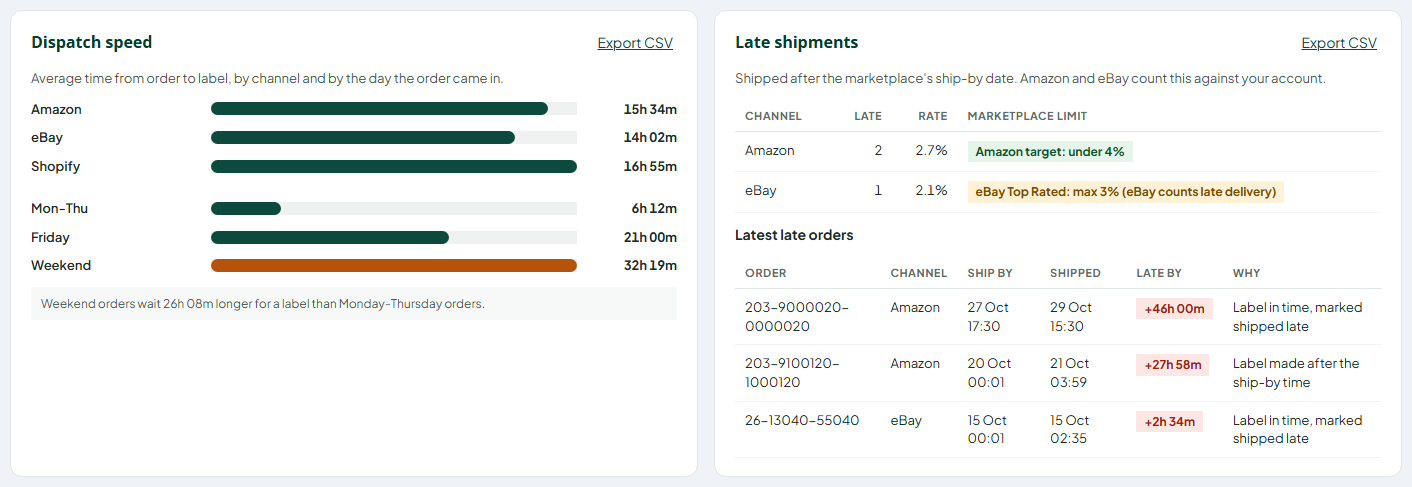
Pick a period – today, 7, 30 or 90 days, or your own dates – and one channel or all of them.
- Late shipments. Your late rate per channel, colour coded against Amazon’s target (under 4%) and eBay’s Top Rated limit (3%), with the latest late orders and the reason. Note: this is late dispatch, the part you control. eBay’s own figure counts late delivery, so your eBay seller dashboard remains the official number.
- Daily dispatch and dispatch speed. Orders in against orders shipped every day, and the average time from order to label by channel and by the day the order came in – spot the slow days.
- Courier scorecard. Built from parcel tracking: average days to deliver, on time against the service promise, problems and parcels sent back, per courier and per service. Know which courier really delivers on time, from your own tracking, not their brochure. Couriers without tracking access show parcel counts until tracking is switched on.
- Products that hold orders up. Products stopping open orders from shipping – no weight, out of stock, not linked to a product, or no shipping rule that fits – with a link to fix each one.
- Cancellations and refunds. Totals, the refunded amount, parcels returned to sender, the reasons Shopify and OnBuy send with a cancellation, and the products cancelled most.
- Export to CSV. Download any report, or the orders behind it, for Excel or Google Sheets. Buyer details are left out unless you tick the box.
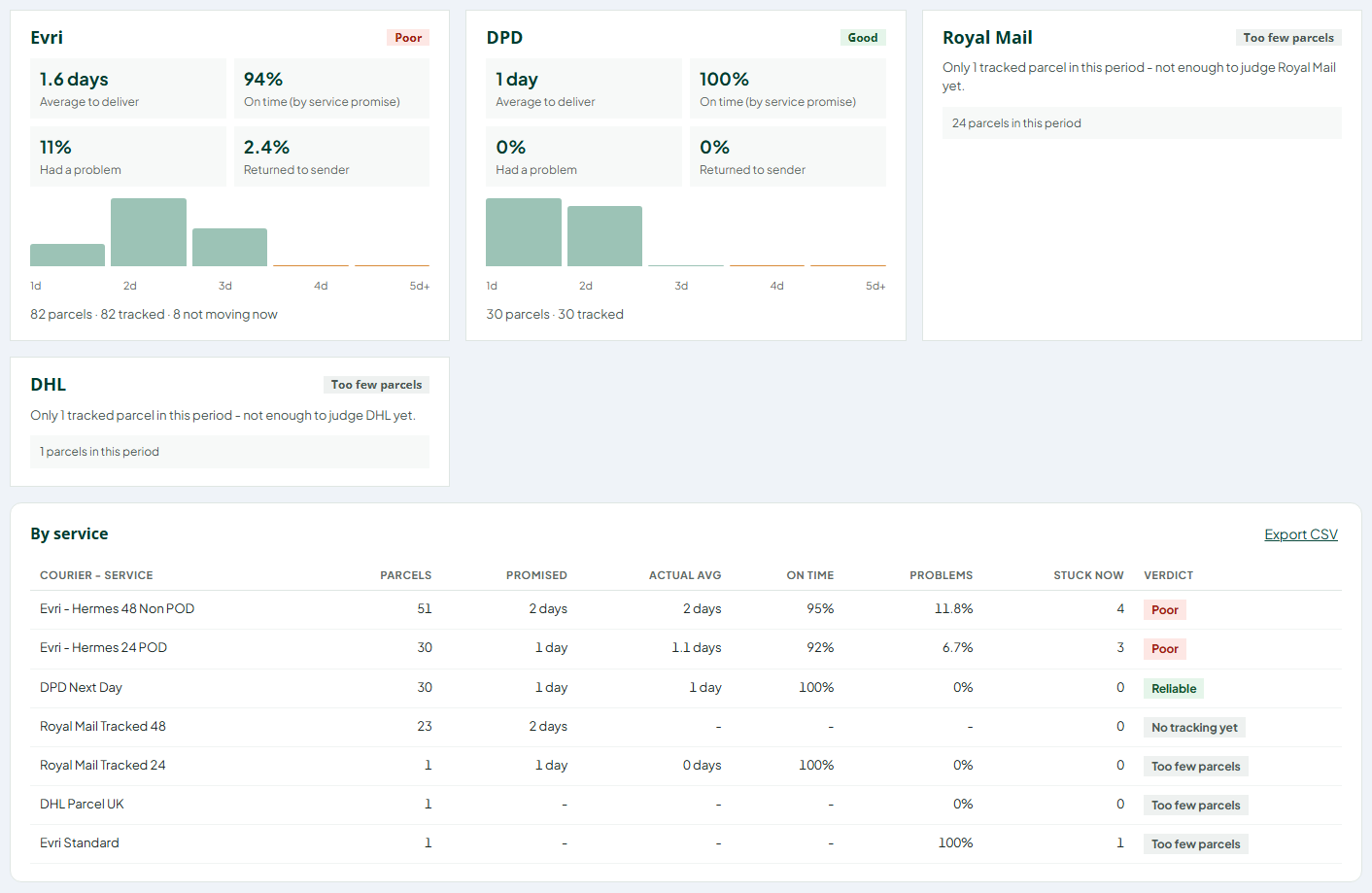
The figures load when you open the report. Day to day, the orders page does the prevention: a ship-by countdown on every Amazon and eBay order and a needs-attention bar that lists late orders and blockers.
Frequently asked questions
What is a good Late Shipment Rate on Amazon?
Amazon requires a Late Shipment Rate under 4%. A healthy target is well below that – under 1% – so a busy week or a courier problem doesn’t push your 10-day figure over the limit.
Does FBA affect my Late Shipment Rate?
No. The Late Shipment Rate only applies to orders you fulfil yourself (seller-fulfilled or FBM). Amazon ships FBA orders, so they aren’t counted.
How long does a late shipment affect my metrics?
A late shipment stays in your Late Shipment Rate for as long as it’s inside the measurement window: Amazon shows the rate over 10 days and 30 days. After 30 days the order drops out of both figures.
Is the late dispatch rate the same as the Late Shipment Rate?
Yes. On Amazon, the Late Shipment Rate is also known as the late dispatch rate. Both mean orders confirmed as shipped after their expected ship date.
What is the eBay late delivery rate limit for Top Rated sellers?
Top Rated sellers on eBay UK can have no more than 5 late deliveries or 3% of transactions. A tracked item only counts as late if it arrived after the estimated delivery date and the carrier didn’t scan it within your dispatch time.
Can I see my late shipments for Amazon and eBay in one report?
Yes, with multichannel order reporting. Stock Konnect’s Orders Insights shows late dispatch per channel next to Amazon’s 4% and eBay’s 3% limits, with the late orders listed so you can see why each was late.
Sources
- Amazon Seller Central UK: Order Performance program policy (Late Shipment Rate, Cancellation Rate, Valid Tracking Rate, On-Time Delivery Rate, Order Defect Rate, handling time)
- eBay UK: Seller performance standards (Top Rated requirements, how late delivery is counted)
- eBay UK: Estimated delivery dates for sellers (dispatch time)