


Stock Konnect is multichannel inventory and order management software for UK and EU sellers on eBay, Amazon and Shopify. October was the month we rebuilt how you work through your orders: the orders page now tells you what to ship first, what will stop an order from shipping, and where every parcel is. We also added a new Insights menu, so you can see how dispatch is going without building a spreadsheet.
Here’s everything that went live between 22 and 30 October.
October at a glance
– A faster, tidier orders page: one summary of today’s work, a needs-attention bar, a ship-by countdown and one search across every tab.
– Checks before you buy a label: stock on every item, an address check, same-buyer merge suggestions and a readiness line for ticked orders.
– Parcel tracking on the orders list: Delivered, In transit or Problem on shipped orders.
– Orders Insights: daily dispatch, late shipments, a courier scorecard, where orders go, what holds them up, cancellations and refunds, and CSV export.
– A fresh look: new sign-in and sign-up pages, a cleaner menu, the Control room dashboard and a public changelog.
1. What changed on the orders page?
The top of the orders page is now one summary strip and a needs-attention bar. You see how many orders are to label, late, due today, labelled but not sent and shipped today, and one click shows only those orders. Amazon and eBay orders show a ship-by countdown, and one search box finds any order on any tab.
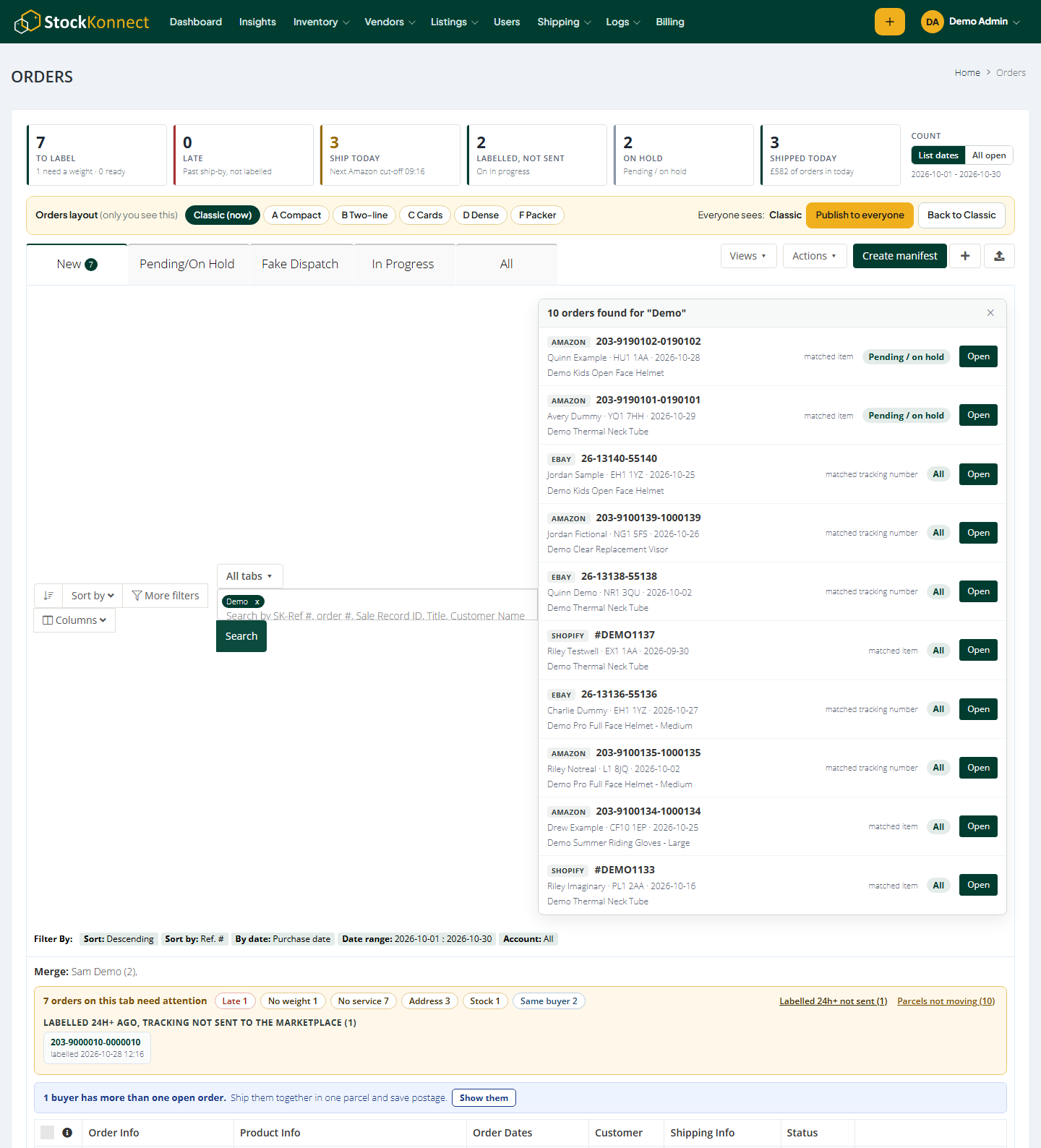
The new top of the orders page.
- Today’s work at a glance: one row of numbers – to label, late, ship today, labelled not sent, on hold and shipped today. Click a number and the list shows only those orders.
- Needs attention: every order that would miss today’s dispatch, grouped by what to fix – late, no weight, no shipping service, address problems and stock problems. It also lists labels bought a day or more ago that were never marked dispatched, so you can catch them before the marketplace does.
- Ship-by countdown: each Amazon and eBay order shows Late, Ship in 2h, Ship today or Tomorrow, taken from the ship-by date the marketplace gives. You see at a glance which orders must go first.
- Search every tab at once: find any order by order number, buyer, postcode, tracking number or item title, without knowing which tab it is on. Choose This tab or All tabs next to the box.
- Saved views and keyboard shortcuts: save the filters you use every day as your own view, share it with the team, and press ? on the orders page to see the shortcuts.
- Order history in one click: when the order arrived, who bought the label, when tracking was sent, your notes and the latest courier scan, in one panel.
- Shorter orders: each item’s size and label title fold into two small buttons. Items with no weight show in amber with their size boxes already open, so the orders that can’t get a label yet are opened for you.
- Faster to open: the summary is now part of the page and a slow background count is gone, so the orders page loads quicker and nothing jumps around.
- New colours: the orders page now uses the Stock Konnect colours, with clearer buttons and easier-to-read rows.
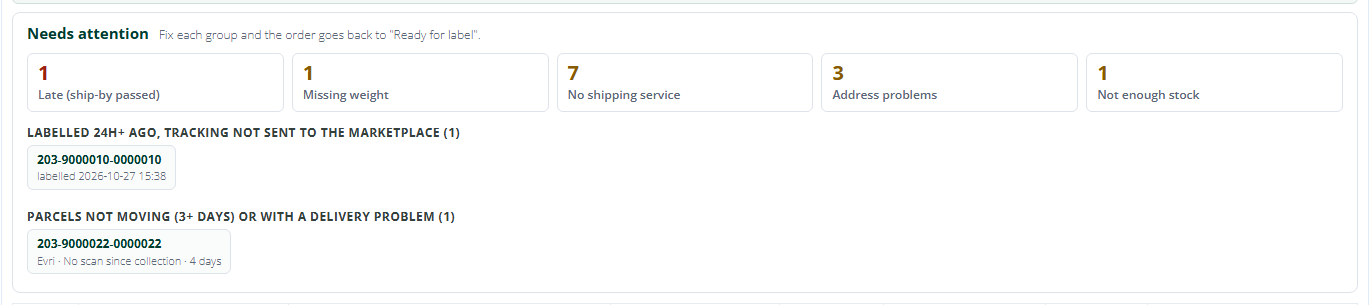
Needs attention groups the orders to fix before today’s dispatch.
Where to find it: Orders.
2. How does Stock Konnect check an order before you buy a label?
Before you pay for a label, each order now shows whether you have the stock, whether the address looks right, and whether the same buyer has another open order to ship with it. Tick a batch of orders and a line tells you which still need a weight or a shipping service.
- Stock on every order: each item shows In stock, Low, Out of stock or Not enough for the quantity ordered, plus what your supplier has. You know if you can ship an order before you print the label. (More on this in our guide to avoiding overselling on multiple platforms.)
- Address check: UK postcodes that don’t look right, missing house numbers, PO Boxes your courier can’t deliver to and phone numbers typed into the address are flagged on the order and at the top of Create shipment. It is advice only – nothing is changed for you.
- Same-buyer merge suggestions: two open orders from one buyer on the same channel? Stock Konnect spots them, and after you confirm, merges them so they ship as one parcel.
- Readiness line: tick orders and see which ones still need a weight or a shipping service before you print labels. The shipping service comes from your shipping rules – see our guide to shipping rules automation.
- Suggest a parcel size: missing a weight? One click suggests a size from similar products you’ve shipped. You check it and press Save as usual.
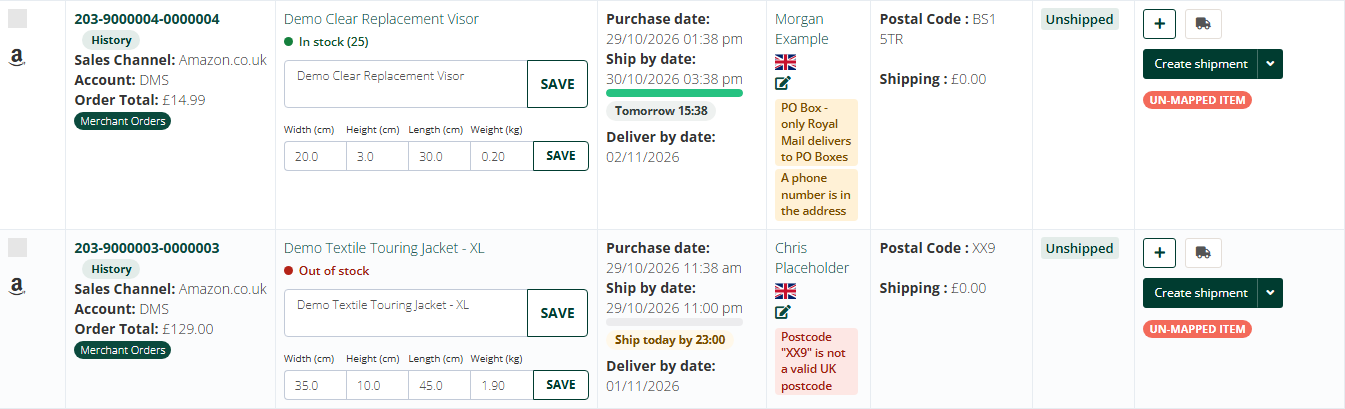
Bad addresses are flagged before you buy the label.
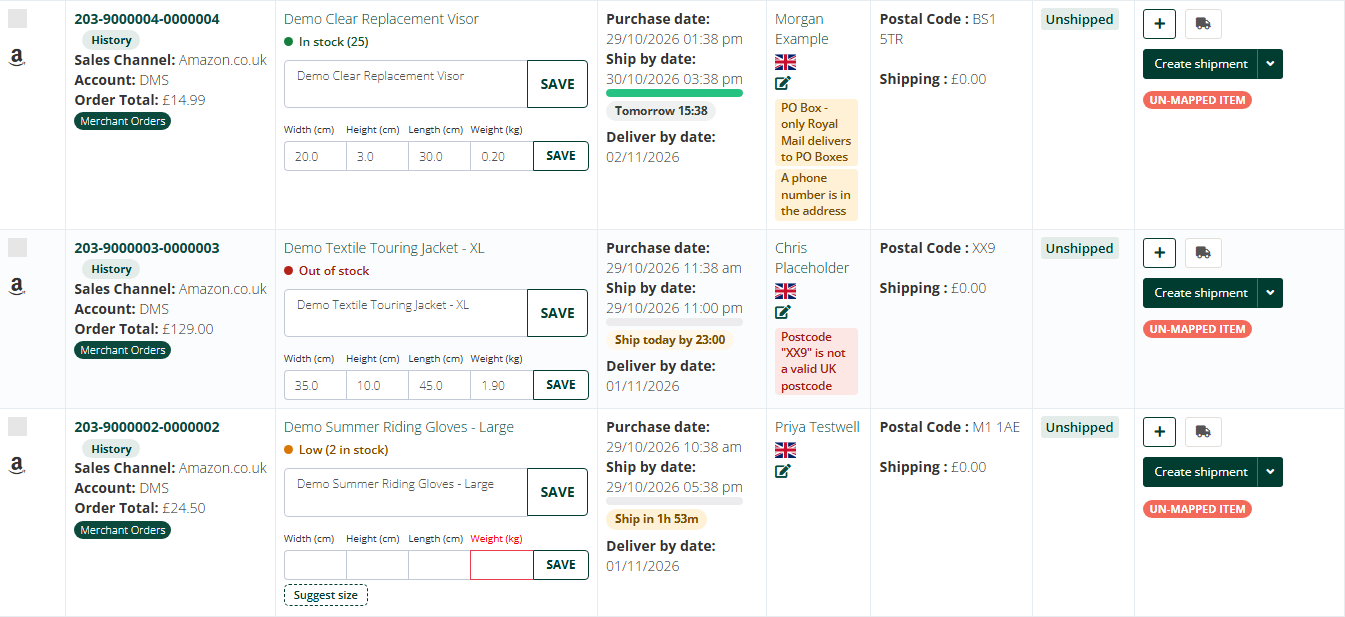
Stock levels on every item.
Where to find it: Orders > each order row, and Orders > tick one or more orders.
3. Can I track parcels from the orders page?
Yes. Shipped orders now show Delivered, In transit or Problem, and parcels with no movement for three days or more are flagged, so you can act before the buyer complains. A one-click link opens the courier’s own tracking page for Royal Mail, Evri and DHL.
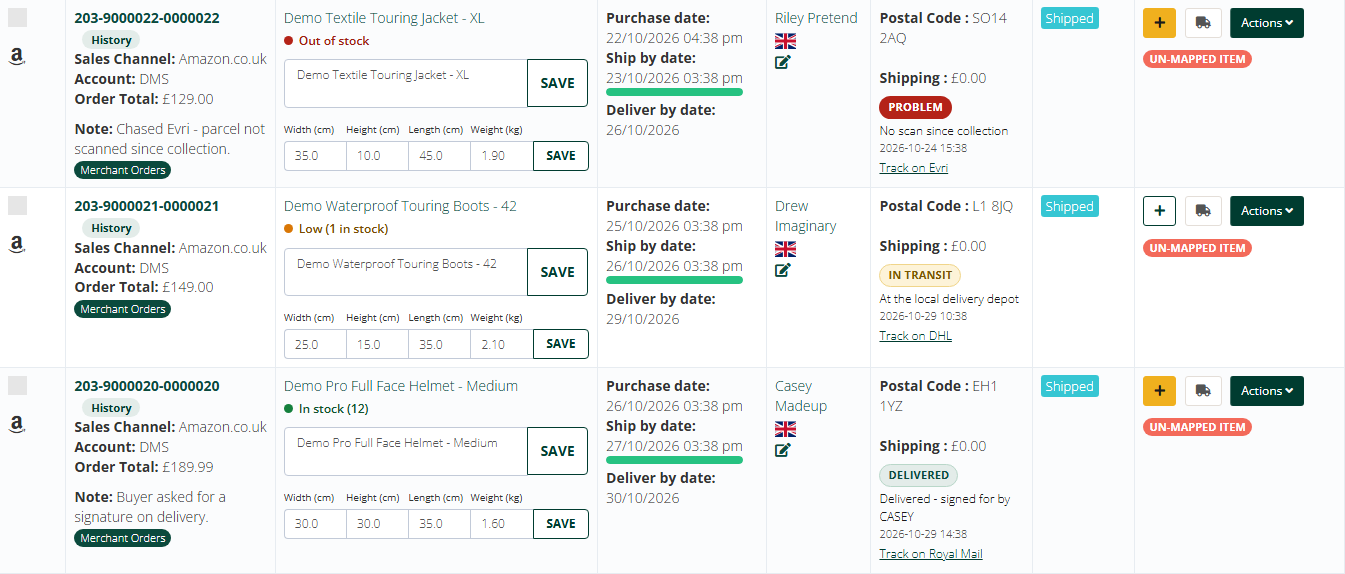
Tracking status on every shipped order.
- A status on every shipped order: Delivered, In transit, Label created, Problem or No movement for a number of days.
- A count above the list: how many parcels are delivered, in transit or have a problem, with a Check tracking now button.
- One click to the courier: open the Royal Mail, Evri or DHL tracking page for the parcel.
Automatic statuses need tracking access from the courier, so they show for couriers where that access is switched on. Tracking is checked when you open the page.
Where to find it: Orders > shipped orders.
4. What is Orders Insights?
Orders Insights is a new menu of reports built from your own orders and tracking. It shows orders in against orders shipped every day, how long orders wait for a label, your late-shipment rate next to Amazon’s and eBay’s limits, how each courier performs, where orders go, what holds them up, and why orders are cancelled.
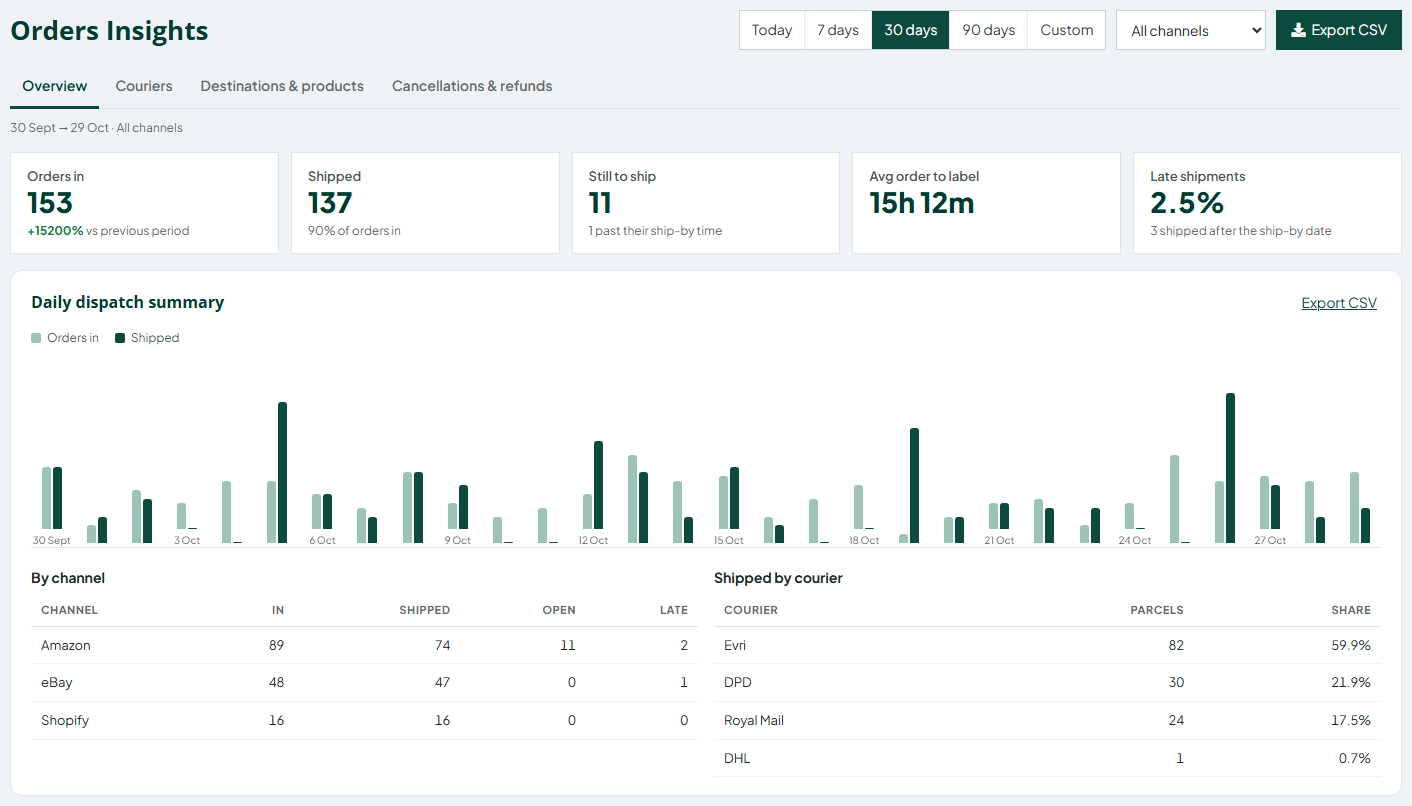
Orders in against shipped per day.
Pick a period – today, 7, 30 or 90 days, or your own dates – and one channel or all of them.
- Daily dispatch and dispatch speed: orders in and shipped per day by channel and courier, and the average time from order to label – by channel and by the day the order came in, so you can spot the slow days.
- Late shipments: your late rate per channel next to Amazon’s target (under 4%) and eBay’s Top Rated limit (no more than 3% of transactions), colour coded. Note that eBay counts late delivery; this report counts late dispatch, the part you control.
- Courier scorecard: from your parcel tracking – average days to deliver, on time against the service promise, problems and parcels sent back, per courier and per service. Know which courier really delivers on time, from your own tracking, not their brochure. Couriers without tracking access show parcel counts only.
- Where your orders go and top products: orders and value by UK region and by country, with average delivery days and your most-used courier, plus your best sellers.
- Products that hold orders up: products stopping open orders from shipping – no weight, out of stock, not linked to a product, or no shipping rule that fits – with a link to fix each. Fix it once and every open order with that product moves on.
- Cancellations and refunds: totals, the refunded amount, parcels returned to sender, the reasons Shopify and OnBuy send, and the products cancelled most.
- Export to CSV: download any report, the orders behind it, or the orders on any Orders tab, for Excel or Google Sheets. Buyer details are left out unless you tick the box.
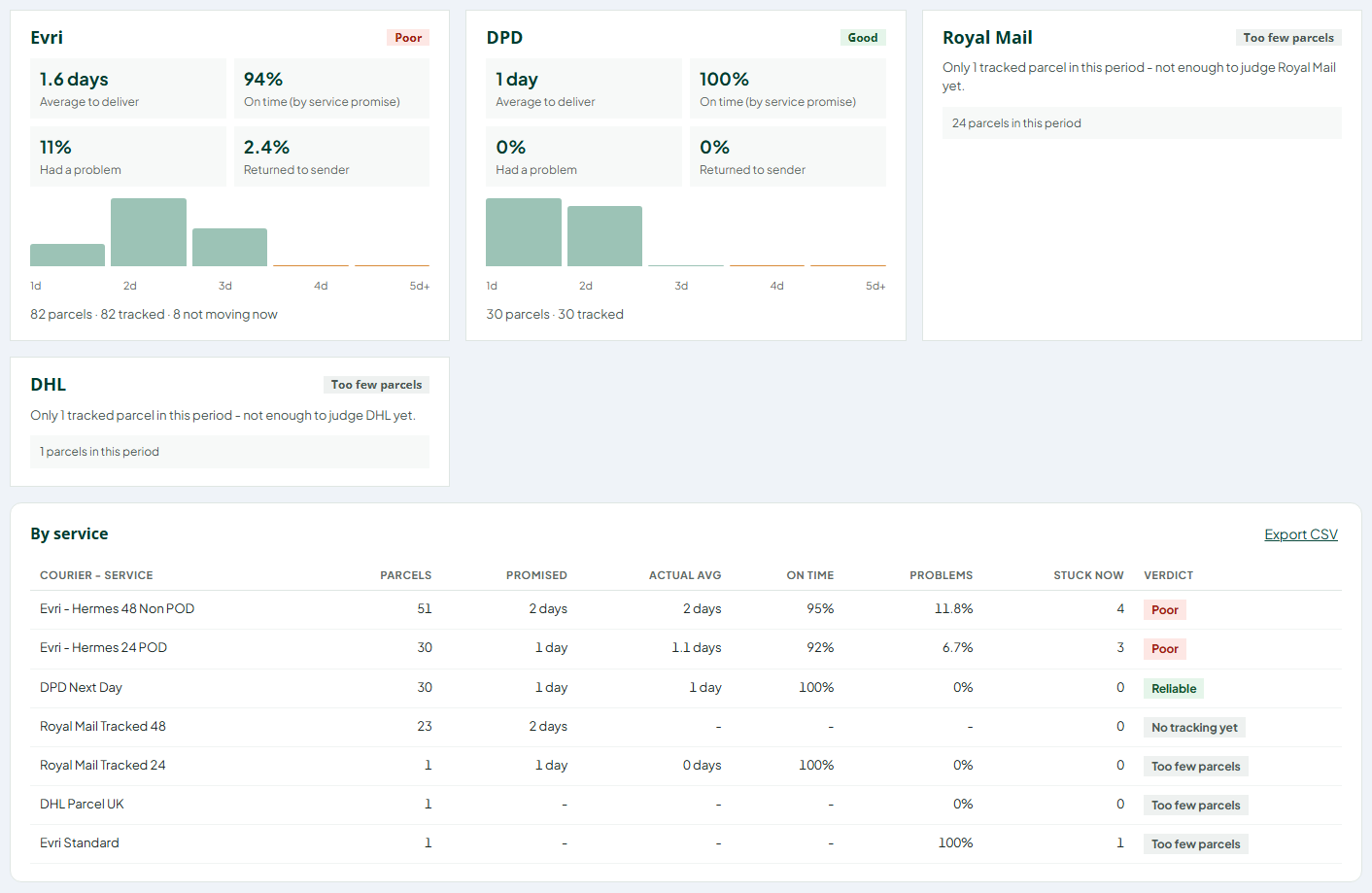
The courier scorecard.
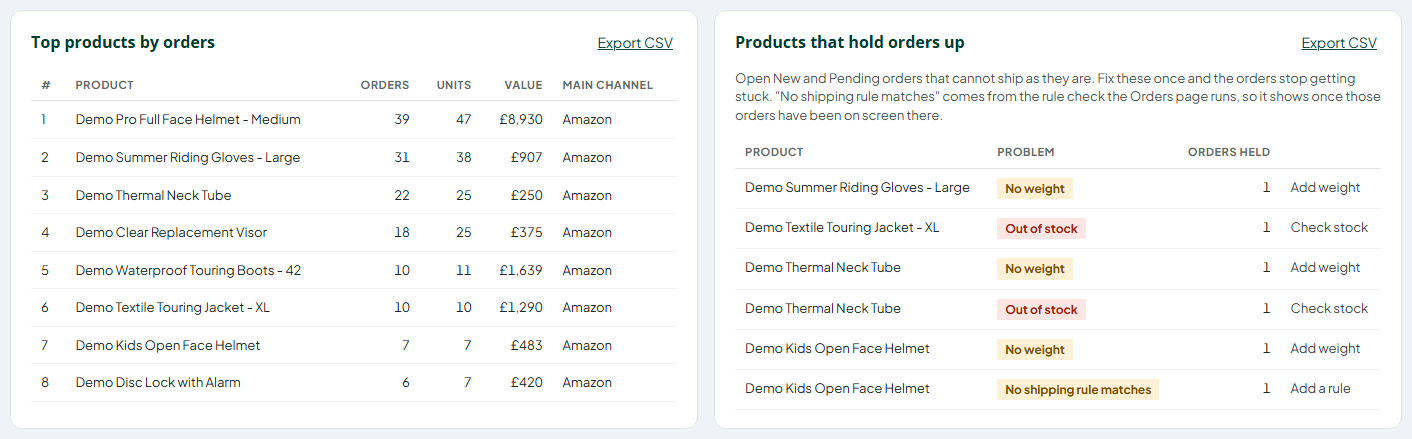
Products holding orders up, with a link to fix each one.
Where to find it: Insights (in the main menu), and Orders > Export CSV.
Try it on your own orders. Connect your eBay, Amazon and Shopify accounts and see today’s work, your late-shipment rate and your courier scorecard. Start your free 30-day trial.
5. What else is new?
Stock Konnect has new sign-in and sign-up pages, a cleaner menu, a Control room dashboard that shows what needs you first, and a public changelog where every update is listed with where to find it.
- New sign-in and sign-up pages: a faster, cleaner sign-in that works well on phones, fewer steps to start your free trial, optional two-step codes and a clearer password reset.
- A cleaner menu: a new header, menu and footer on every page, in the Stock Konnect colours, easier to scan and to use on smaller screens.
- Control room dashboard: dispatches not confirmed, broken listing links, orders to pick and stock running out – and every number opens the orders or listings behind it.
- What’s new on the sign-in page and a full changelog: the two newest updates appear when you sign in, with a link to the Stock Konnect changelog. Filter it by type or area; each update says where to find it.
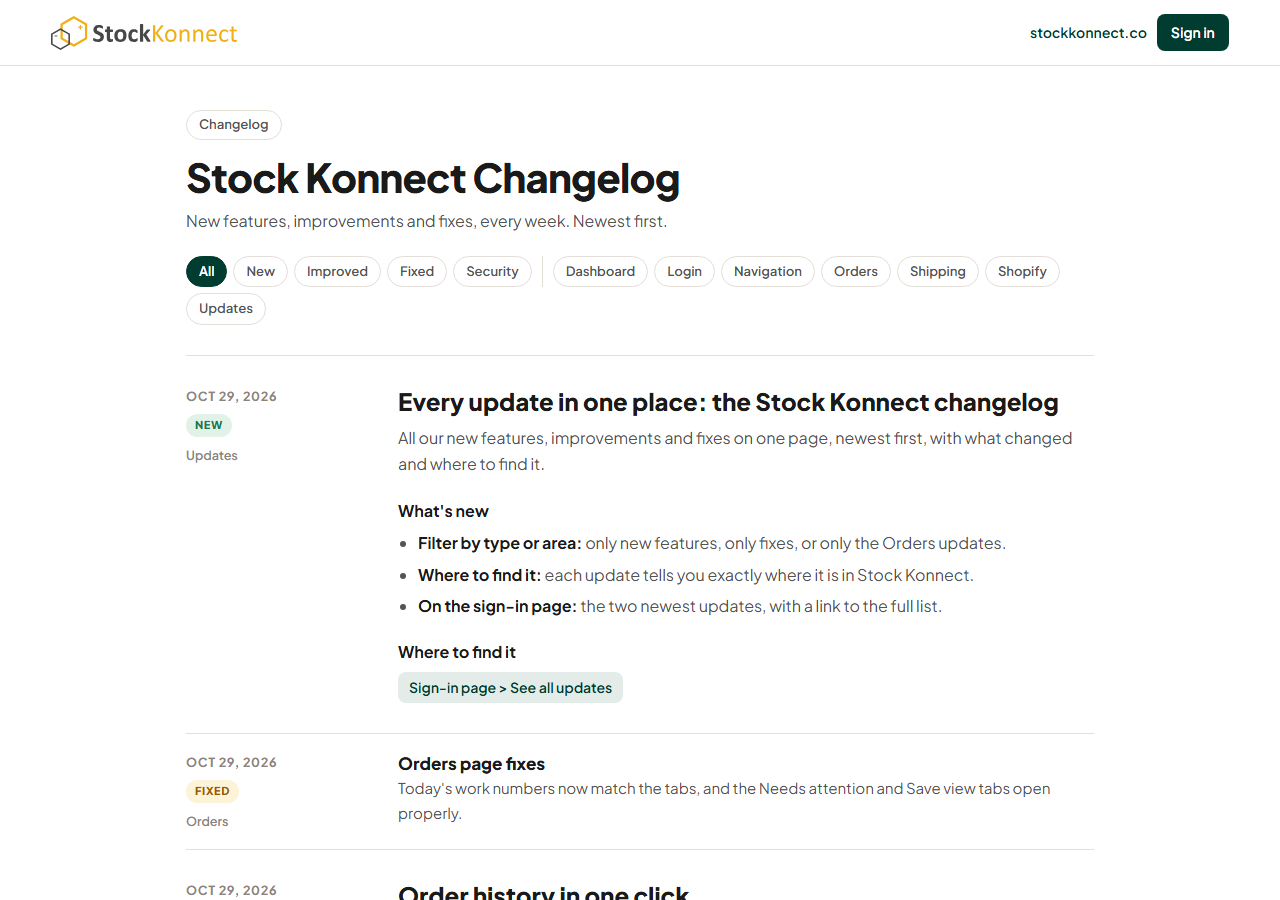
Every update on one page.
Improvements & bug fixes
- Shopify stock sync repairs itself: Shopify stock links that stop working are found every day and matched again by SKU, so stock keeps flowing to your store.
- Amazon orders stuck as not shipped: Amazon orders that were shipped but still showed as waiting have been corrected, and new ones no longer get stuck.
- Sign-in security: stronger protection against password guessing and automated sign-ups.
- Late shipments show the eBay limit: your eBay late rate now sits next to eBay’s Top Rated limit.
- Faster Insights: reports that read Shopify order lines and Amazon refunds load faster.
- Orders page counts: today’s work numbers match the tabs, and the Needs attention and Save view tabs open properly.
- Address check and countdown: bad postcodes and missing house numbers are flagged on orders that include a phone number, and shipped, cancelled and refunded orders no longer show Late.
- Export box: the Export box opens only when you click Export CSV.
Frequently asked questions
Do I need to switch anything on?
No. Every update in this post is live for all Stock Konnect accounts. Open the orders page or the Insights menu to see them. Automatic parcel statuses, and the courier scorecard built from them, need tracking access from each courier.
Does the ship-by countdown work for Shopify orders?
No. The countdown uses the ship-by date that Amazon and eBay send with each order. Shopify, WooCommerce and OnBuy orders don’t come with one, so they show no countdown. They still appear in Today’s work and Needs attention.
Is the late-shipment figure the same as eBay’s?
Not exactly. eBay measures late delivery; Orders Insights measures late dispatch – orders shipped after the marketplace’s ship-by date. Dispatch is the part you control, so it is the best early warning, but your eBay seller dashboard remains the official figure.
Where can I see every Stock Konnect update?
On the public changelog at app.stockkonnect.co/changelog.html. It lists every new feature, improvement and fix, newest first, with screenshots and where to find each one. The two newest updates also show on the sign-in page.
Try the October updates
All of this is part of Stock Konnect’s order management for eBay, Amazon and Shopify sellers in the UK and EU. If you’re not a customer yet, start a free 30-day trial and connect your channels. Already using Stock Konnect? Sign in and open the orders page – the summary strip is waiting at the top.
Sources
- Amazon Seller Central UK: Order Performance program policy – Late Shipment Rate under 4%, measured over 10 and 30 days, seller-fulfilled orders only.
- eBay UK: Seller performance standards – Top Rated: late delivery rate no more than 5 transactions or 3%.
- Stock Konnect: the full changelog – every update with the date it went live.