
Already selling on eBay but not making much revenue?
Are you struggling to increase your eBay sales and improve listing visibility? Many eBay sellers face challenges in reaching the right buyers, generating consistent traffic, and improving conversion rates. In many cases, the problem is not the product itself—it is how the listing is optimized.
Successful selling on eBay depends heavily on listing quality, product attributes, and search visibility. When product listings lack important information, they become harder for buyers to discover through eBay search filters and marketplace results.
The first step toward improving sales is increasing the visibility of your products so they can reach more relevant buyers. There are generally two ways to achieve this:
1. Paid Visibility Methods
You can use sponsored listings and premium listing features to increase exposure and attract more traffic to your products.
2. Organic Listing Optimization
A more sustainable and cost-effective approach is optimizing your eBay listings with accurate item specifics and product attributes. Proper item specifics help eBay better understand your products, improve listing relevance, and increase visibility in marketplace search results.
In this guide, we’ll focus on the second approach—an efficient strategy that helps sellers improve listing performance, increase product discoverability, and drive more sales without relying entirely on paid promotion.
Improve eBay Sales with Product Catalog Data and Item Specifics
1: Add Product Details from the eBay Catalog
One of the most effective ways to improve eBay sales and increase listing visibility is by using product information from the eBay product catalog. This method helps sellers create more complete, accurate, and professional listings while reducing manual work.
The eBay product catalog functions as a centralized database of product information across multiple categories. It contains structured product data, product identifiers, specifications, and images that help standardize listings across the marketplace.
When your product matches an existing catalog entry, eBay can automatically populate important listing details such as:
- Brand name
- Product model number
- Size and dimensions
- Color and product variations
- Product identifiers
- Technical specifications
- High-quality product images
Using catalog data provides several benefits:
- Faster listing creation
- Improved listing accuracy
- Better catalog consistency
- Enhanced buyer experience
- Stronger search visibility
- Increased product discoverability
By using structured product information, eBay can better understand your listing and match it with relevant buyer searches and marketplace filters. This improves the chances of your products appearing in search results and reaching more potential customers.
But what happens if your product does not exist in the eBay catalog?
This is where item specifics become extremely important.
Item specifics allow sellers to manually provide structured product attributes that help eBay understand products more accurately. Properly optimized item specifics improve listing relevance, increase search visibility, and help buyers find the right products more easily.
In the next section, we’ll see how item specifics can directly improve eBay listing performance and sales.
⇒ Tip-02: Use Item Specifics
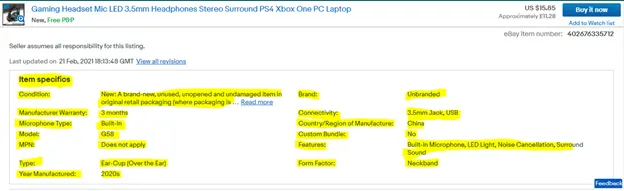
What are item specifics?
As you can see from the above image, item specifics are the terms that help to qualify the products in a descriptive manner. These specifics usually include the brand, size, model, type, color, or any other relevant descriptives. These item-specific labels vary depending on the product type.
ATTENTION:
If a buyer searches the product and filters it using item specifics, your item will not be displayed if you have not set the item specifics!
How to describe item-specifics?
The root cause of any product’s successful sale is its display in the right search. Therefore, it’s a vital key to get your items in the search made by potential buyers. For this purpose, you need to examine how people tend to shop on eBay.
For instance, if a buyer wants to shop for a laptop, he will search for its RAM, ROM, processor, etc. So observe the users’ search behavior and set the item specifics for your products.
Item specifics priority levels
Following are the three priority levels for item specifics on your listings.
1:Required
Necessary product information is considered as required in priority. For example, brand, size, and color are vital pieces of information and have decisive power regarding the buyer experience. Thus, they ensure you maximum product visibility.
Note: new and revised listings with missing required item specifics will be blocked.
2: Recommended
The recommended item specifics aim to enhance the search experience of your potential shoppers. It is highly recommended to fill in as many item specifics as possible.
3: Additional
As the name suggests, the additional item specifics are a utility that helps buyers know more about the product. However, it’s a good practice to use eBay’s suggested item specifics as much as possible instead of defining the custom ones.
How do item specifics work?
So basically, eBay’s item specifics construct a structure that acts as a search key. This key helps the buyers to reach the right products. This structure-oriented information ensures that products’ features can be easily filtered and found on eBay regarding any product.
It’s no less than a myth that stuffing the title with the maximum information, or writing a long description, is sufficient to lift the product exposure within search.
You’ll be amazed to know that regular search engines also follow this structure-oriented technique to display information to their searchers. This implies that having structured item-specific data within your eBay item helps to extend your product visibility outside eBay as well.
When listing to eBay it is a good practice to try filling in as many item specifics as possible in order to expand search visibility.
Tools That Help Manage eBay Item Specific Requirements
Managing eBay item specifics manually can become challenging, especially for sellers handling large product catalogs or operating across multiple marketplaces. As product variations, attributes, and marketplace requirements continue to evolve, keeping listings updated and consistent can become a time-consuming process.
Modern listing management tool help ecommerce businesses simplify this process by automating product data management and maintaining accurate listing information across channels.
StockKonnect helps sellers manage and organize product attributes, listing data, and item specifics through a centralized system. This helps multichannel sellers maintain consistent product information while reducing manual effort and minimizing listing errors.
Key benefits include:
- Centralized product data management
- Improved catalog consistency across marketplaces
- Faster listing updates
- Reduced manual work
- Better listing accuracy
- Support for evolving marketplace requirements
For ecommerce businesses selling across platforms such as eBay, Amazon, Shopify, and other marketplaces, automated listing workflows can improve operational efficiency and help maintain accurate product information at scale.
By using structured product data and keeping item specifics updated, sellers can improve listing visibility, create a better buyer experience, and support long-term marketplace growth.